Pricing Scouting inventory systematically
← Previous · Guide home · Topic index · Download PDF · Next →
Repeated pricing work benefits from consistent search settings. These shortcuts can make that review more efficient.
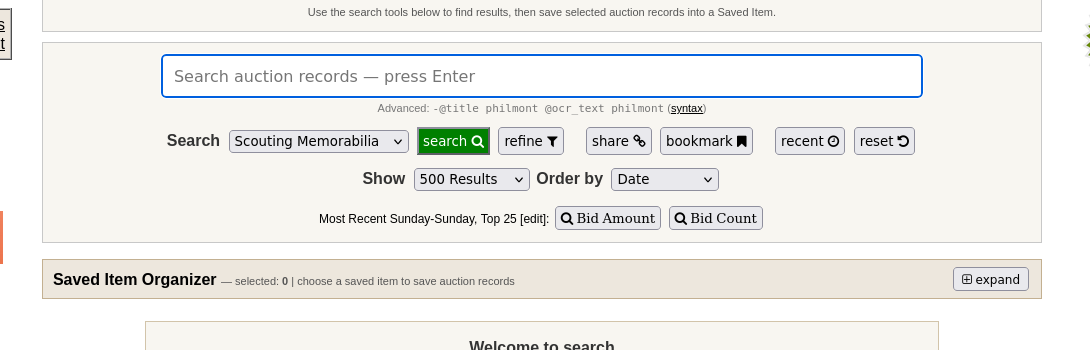
These quick Search controls help you change how many records you see and how they are ordered. Use them to review recent sales or bidding activity before pricing inventory.
Continue below for step-by-step instructions and examples ↓
You regularly sell collectibles and need consistent research habits across many listings.
A practical starting workflow
- Group inventory by recognizable issue or collecting category.
- Use consistent search terms and comparable-selection criteria.
- Note date, condition, lot composition, and unusually high or low sales.
- Distinguish fast-moving common inventory from items requiring deeper research.
- Recheck evidence periodically rather than treating old price research as permanent.
Interpreting the evidence
Use comparable historical sales rather than treating one record as a definitive current valuation. Check item identity, condition, sale date, and whether the record covers a lot or a single item.
For more precise comparisons, consult search fields and filters. OCR may help discover poorly titled records, but OCR matches require visual verification.
Historical sales are evidence for comparison, not a certified appraisal.
Consistent research across inventory
Use a standard sequence: identify the issue, search exact terminology, refine the period and listing characteristics, inspect item details and images, and record several appropriate comparisons. Seller and item-ID filters help revisit specific evidence.
Record uncertainty explicitly when sales are sparse or when the only results are lots. Repeat the research when listing conditions or market activity change. This use case focuses on price research.